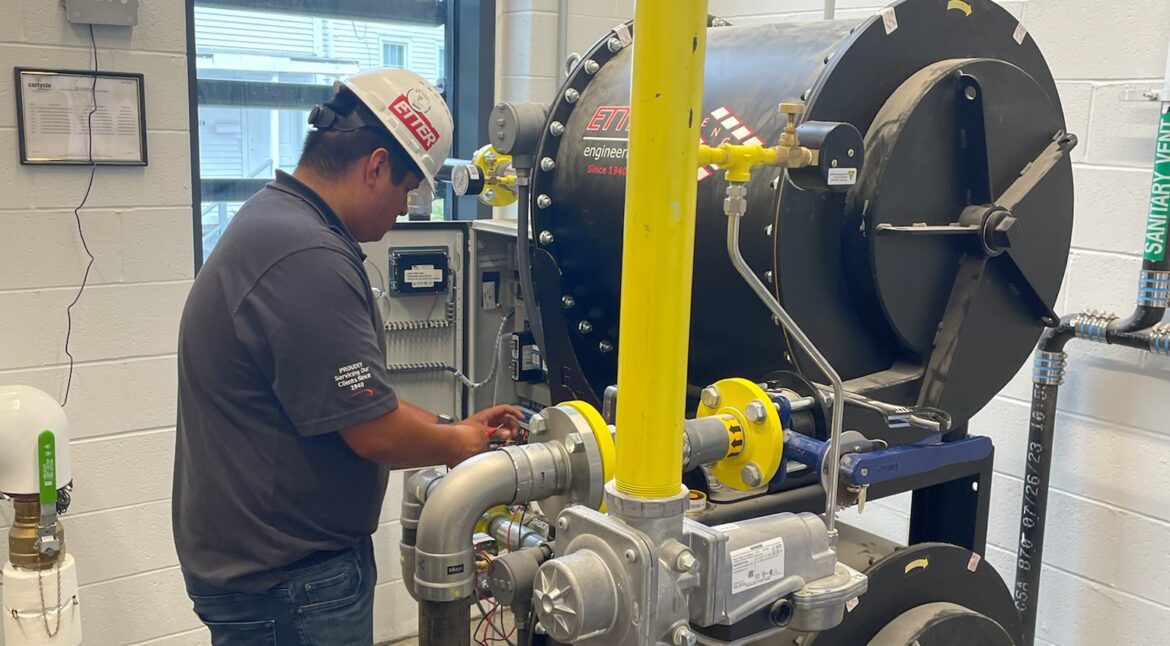
It’s a question we hear often:“What’s the best way to control my gas booster?”
The truth is, there isn’t a single answer. The right control method depends entirely on the equipment, layout, and most importantly, the application. A school’s boiler plant in Boston is very different from a backup generator in Kentucky.
Here’s a breakdown of the most common control strategies engineers use—and when each one makes sense.
The Basics: Why Controls Matter
A gas booster’s job is to supply the right pressure when equipment calls for it. But if the booster runs unnecessarily, it wastes energy, drives up maintenance, and adds wear to the system.
That’s why choosing the correct control mode is so important.
Mode I: Simple Interlock Controls
Best for: Compact systems with equipment close to the booster (e.g., two boilers within 40 feet).
How it works: Each boiler is wired to the booster’s control panel. When a boiler starts, the booster starts. When all boilers shut down, the booster shuts off.
Advantages: Cost-effective, simple to wire, reliable.
Limitations: Not practical for large or distributed facilities (skyscrapers, warehouses, multi-acre campuses) as making home-run wiring circuits becomes expensive and not practical.
Mode R: Flow-Sensing Controls
Best for: Large facilities with distributed equipment.
How it works:The controls monitor the system flow with an electronic gas regulating valve. The booster turns on automatically when downstream flow is detected by the specialized valve.
Advantages: No need for wiring every piece of load equipment back to the booster.
Impact: More sophisticated, requires additional programming and components and with that comes a bit of cost.
Mode G: Generator Controls
Best for: Emergency standby generators.
How it works: Dedicated programming ensures the booster reliably delivers pressure whenever the generator calls for fuel.
Advantages: Tailored specifically for generator requirements, ensuring compliance and reliability.
Key Takeaway
There’s no one-size-fits-all control method for gas boosters. The right choice depends on system size, layout, and criticality.
Small systems: Mode I (simple interlock).
Large facilities: Mode R (flow-sensing).
Efficiency-focused: Mode V (VFD).
Generators: Mode G (standby-specific).
ETTER has decades of experience designing and commissioning booster control strategies. If you’re planning a new system—or troubleshooting an existing one—our engineers can help you select the best control approach for your application.
We use cookies and process personal data to make our site work, for analytics, and for ads personalization. Some of this data is shared with our partners. Open the preferences panel to see which services we use and choose what you allow.
Essential cookies enable basic functions and are necessary for the proper function of the website.
Name
Description
Duration
Cookie Preferences
This cookie is used to store the user's cookie consent preferences.
30 days
Statistics cookies collect information anonymously. This information helps us understand how visitors use our website.
GoDaddy's visitor traffic tracking, added automatically to sites hosted with GoDaddy and to sites built with GoDaddy Website Builder. It records page views, clicks, and page timing, and sends them to GoDaddy to measure traffic and site performance.
Stores a randomly generated visitor ID so GoDaddy's traffic tracking recognizes a returning visitor across sessions.
1 year
_tccl_visit
Stores a randomly generated ID for the current visit so page views and clicks can be grouped into one session.
30 minutes
_scc_session
Holds the number of pages viewed in the current visit and the time of the last interaction, so GoDaddy's traffic tracking can tell when a visit has ended.
20 minutes
Google Analytics is a powerful tool that tracks and analyzes website traffic for informed marketing decisions.
Contains custom information set by the web developer via the _setCustomVar method in Google Analytics. This cookie is updated every time new data is sent to the Google Analytics server.
2 years after last activity
__utmx
Used to determine whether a user is included in an A / B or Multivariate test.
18 months
_ga
ID used to identify users
2 years
_gali
Used by Google Analytics to determine which links on a page are being clicked
30 seconds
_ga_
ID used to identify users
2 years
_gid
ID used to identify users for 24 hours after last activity
24 hours
_gat
Used to monitor number of Google Analytics server requests when using Google Tag Manager
1 minute
_gac_
Contains information related to marketing campaigns of the user. These are shared with Google AdWords / Google Ads when the Google Ads and Google Analytics accounts are linked together.
90 days
__utma
ID used to identify users and sessions
2 years after last activity
__utmt
Used to monitor number of Google Analytics server requests
10 minutes
__utmb
Used to distinguish new sessions and visits. This cookie is set when the GA.js javascript library is loaded and there is no existing __utmb cookie. The cookie is updated every time data is sent to the Google Analytics server.
30 minutes after last activity
__utmc
Used only with old Urchin versions of Google Analytics and not with GA.js. Was used to distinguish between new sessions and visits at the end of a session.
End of session (browser)
__utmz
Contains information about the traffic source or campaign that directed user to the website. The cookie is set when the GA.js javascript is loaded and updated when data is sent to the Google Anaytics server
6 months after last activity
Marketing cookies are used to follow visitors to websites. The intention is to show ads that are relevant and engaging to the individual user.
HubSpot is an all-in-one marketing, sales, and customer service platform that streamlines business growth.
This cookie is used to recognize visitors who chat with you via the chatflows tool. If the visitor leaves your site before they're added as a contact, they will have this cookie associated with their browser.
13 months
__hssrc
Whenever HubSpot changes the session cookie, this cookie is also set to determine if the visitor has restarted their browser.
session
hs-messages-is-open
This cookie is used to determine and save whether the chat widget is open for future visits.
30 minutes
__hssc
This cookie keeps track of sessions.
30 minutes
hubspotutk
This cookie keeps track of a visitor's identity. It is passed to HubSpot on form submission and used when deduplicating contacts.
13 months
__hstc
The main cookie for tracking visitors.
13 months
hs_langswitcher_choice
This cookie is used to save the visitor's selected language choice when viewing pages in multiple languages.
2 years
hs-membership-csrf
This cookie is used to ensure that content membership logins cannot be forged.
session
__hsmem
This cookie is set when visitors log in to a HubSpot-hosted site.
1 year
hs-messages-hide-welcome-message
This cookie is used to prevent the chat widget welcome message from appearing again for one day after it is dismissed.
1 day
__hs_notify_banner_dismiss
This cookie is used when the website uses a Notify consent banner type.
180 days
hs_ab_test
This cookie is used to consistently serve visitors the same version of an A/B test page they’ve seen before.
session
__hs_gpc_banner_dismiss
This cookie is used when the Global Privacy Control banner is dismissed.
180 days
__hs_initial_opt_in
This cookie is used to prevent the banner from always displaying when visitors are browsing in strict mode.
7 days
__hs_cookie_cat_pref
This cookie is used to record the categories a visitor consented to.
6 months
hubspotapi
This cookie allows the user to access the app with the correct permissions.
7 days
__hs_do_not_track
This cookie can be set to prevent the tracking code from sending any information to HubSpot.
13 months
hubspotapi-csrf
This is used for CSRF prevention - preventing third party websites from accessing your data. Expires after a year.
1 year
__hs_opt_out
This cookie is used by the opt-in privacy policy to remember not to ask the visitor to accept cookies again.
13 months
hubspotapi-prefs
This is used with the hubspotapi cookie to remember whether the user checked the 'remember me' box (controls the expiration of the main cookie's authentication).